Guide
Data exfiltration techniques and the traces they leave
Data that leaves a company goes through a channel: a USB drive, an email, a website, a screen. This guide maps each exit channel of a Windows workstation to the matching technique in version 20 of MITRE ATT&CK, the public reference knowledge base of attack techniques. For each one, it shows the trace Windows and Exchange keep without a dedicated tool, what detection-only DLP (data loss prevention) software adds, and what stays invisible. It was written by the team at SSHack, an offensive security firm and the publisher of VigiDoc, based on ATT&CK technique pages, Microsoft documentation and checks on a Windows 11 computer.
In brief
Data exfiltration is the unauthorized transfer of data out of an organization. MITRE ATT&CK version 20 describes ten exfiltration techniques, four of which apply directly to the workstation: physical medium (T1052), alternative protocol (T1048), splitting into small transfers (T1030) and web service (T1567, including cloud storage, T1567.002). On Windows, each channel leaves a different trace without a dedicated tool, but almost never the list of files that left or their content. The registry records when the USB drive was connected, Exchange message trace gives the sender, recipient and subject of an email, and browser history shows the visit to a storage site. A detection DLP like VigiDoc adds the name and a copy of files copied to a USB drive or attached to an Outlook email. Printing, screenshots, a phone connected in file transfer mode (MTP), text pasted into webmail or an AI tool, and the content of password-protected archives remain blind spots.
What MITRE ATT&CK classifies as "exfiltration"
Exfiltration is the unauthorized transfer of data out of a system or an organization. MITRE ATT&CK treats it as a tactic in its own right, TA0010. Version 20, released on October 13, 2026, lists ten techniques under it. Four describe actions possible from a workstation: physical medium (T1052), alternative protocol (T1048), web service (T1567) and data transfer size limits (T1030). Automated exfiltration (T1020) joins them as soon as a script or a rule does the work. The others target networks, the cloud or malware, such as an attacker's command and control channel (T1041) or, new in this version, a company AI agent hijacked through prompt injection (T1700). Two techniques from the Collection tactic often prepare the exfiltration: archiving (T1560) and screen capture (T1113).
ATT&CK describes attackers. Its technique pages do not talk about employees, and mapping an everyday action to a technique is our interpretation. It holds up, though. MITRE's Center for Threat-Informed Defense applied the ATT&CK framework to real insider threat cases contributed by organizations across several sectors, including financial institutions (Insider Threat TTP Knowledge Base, version 2). It draws a typical pattern from them: files downloaded from OneDrive or SharePoint, often in batches of more than 500, staged on the computer or in an archive, then exfiltrated. The USB drive (T1052.001) appears more often than any other exfiltration technique.
The same channel serves mistakes, convenience and malice. In Verizon's 2026 DBIR, breaches involving deliberate misuse of access (Privilege Misuse) account for just under 4% of the total; in 60% of them the motive is convenience, in 33% financial gain. The example the report gives is an employee sending company data to their personal email to work from home. On the external attacker side, ANSSI (France's national cybersecurity agency) learned of 196 data exfiltration incidents in 2025, versus 130 in 2024, and found in its incidents the same storage services employees use: Google Drive, Dropbox, MEGA. For the share of insider threats in data leaks overall, see our 2026 figures (in French) and our page Insider threat: definition, profiles, indicators.
10
techniques in the MITRE ATT&CK Exfiltration tactic; four describe actions possible from a workstation.
MITRE ATT&CK, version 20 · October 13, 2026
196
data exfiltration incidents known to ANSSI in 2025, versus 130 in 2024; only 80 claims could be confirmed.
ANSSI, Cyber Threat Overview 2025 (Panorama de la cybermenace 2025), March 2026, page 13
60%
of breaches involving deliberate misuse of access are motivated by convenience; 33% by financial gain.
Verizon, DBIR 2026 · 766 confirmed breaches in the Privilege Misuse pattern, worldwide, November 2024 to October 2025
500+
files downloaded from OneDrive or SharePoint before exfiltration in typical insider threat cases; the USB drive is the most frequent exfiltration technique.
MITRE Center for Threat-Informed Defense, Insider Threat TTP Knowledge Base v2, 2024
The table: channel, technique, trace
The table follows the channels from the most common to the most discreet. The "Native trace" column describes what Windows or Exchange keep in their default configuration, or after a free setting change where stated. The following sections cover each row in detail.
| Channel | ATT&CK technique (v20) | Native trace, no tool | VigiDoc trace | Blind spot |
|---|---|---|---|---|
| USB drive, external disk or SSD | T1052.001 | The drive and when it was plugged in (USBSTOR registry key, setupapi.dev.log, event 1006). Files only if 4663 auditing was enabled beforehand. | Insertion and removal (name, size, serial number), every file copied or overwritten, encrypted copy of the file | The content of an encrypted archive |
| Phone in file transfer mode (MTP) | T1052 (the technique page mentions phones) | The device name (Windows Portable Devices registry key); a WPD-class 6416 event if PNP auditing is enabled. No files. | Nothing | The whole channel |
| Outlook email to a personal or external address | No dedicated technique; SMTP is among the protocols listed in T1048 | Exchange message trace: date, sender, recipients, subject, size. No content. | The send (date, subject, recipients) and a copy of each attachment; alert on the subject, the attachment name or its content | The content of an encrypted attachment |
| Personal webmail | T1567 | Browser history: address, title, time (90 days in Chrome), excluding private browsing | Gmail and Outlook on the web: every attachment added, with the account, subject, recipients and an encrypted copy; other webmail: the visit (address, title, time), flagged if it contains a keyword | Typed text; attachments in other webmail; forwarding a message that already contains an attachment |
| Cloud storage, consumer file transfer service | T1567.002 | Browser history; the sync client's own logs if it is installed | The visit to the site | The uploaded file; anything sent through a sync client |
| Consumer generative AI | T1567 (our interpretation) | Browser history | The visit, flagged if the service name is a keyword | Pasted text, uploaded files |
| FTP, SFTP, curl | T1048 | Event 4688 with the command line, if two settings that are off by default are enabled | Nothing | The whole channel |
| Archive before exfiltration | T1560.001 | Event 4688 if enabled; archive name in a 4663 event if it goes to a USB drive | The archive copied to a USB drive or attached, with its copy; content of a .zip read if it is not encrypted | The content of an encrypted archive, or of a format the tool does not read |
| Splitting into chunks | T1030 | Each chunk has its own trace: several sends, several files | Each chunk logged, with its copy | The content of the volumes of a split archive |
| Screenshot | T1113 (collection) | The image saved to Pictures\Screenshots by the Windows 11 Snipping Tool, until the folder is emptied | Nothing on the screenshot itself; the image if it later leaves by USB drive or Outlook | The screenshot itself |
| Photo of the screen with a phone | None | None | Nothing | Everything |
| Printing | None | Event 307 in the PrintService log, disabled by default | Nothing | Everything |
| Script, scheduled task, forwarding rule | T1020; T1114.003 for the forwarding rule | Event 4698 if auditing is enabled; message trace for the forwarding rule | Copies to a USB drive made by a script, like any other copy | Forwarding executed by the mail server, outside the computer |
Reading down the columns, two lessons emerge. The native trace almost always identifies the channel, rarely the file, never its content; and for half the rows, it only exists if a setting was enabled before the events. The blind spot column is a reminder that a tool installed on the computer only sees what it monitors: an action that involves neither a copied file nor a monitored application escapes it.
Physical medium: USB drive, disk, phone (T1052)
Technique T1052 covers any exfiltration through a medium that can be carried away: external hard drive, USB drive, phone, MP3 player. It mentions air-gapped networks, where a physical medium is the only possible way out. The USB drive is the most thoroughly documented channel on this site, and we will not repeat the details here. Without a tool, Windows remembers the drive, not the files. Our guide How to tell if an employee copied files to a USB drive reviews the traces one by one, and our free PowerShell script lists the USB drives plugged into a computer. Our tutorial on removable storage auditing explains how to get the list of files written (event 4663), provided you enable it beforehand.
The phone deserves its own row. Connected in file transfer mode (MTP, Media Transfer Protocol), it has no drive letter: Windows classifies it as a portable device (WPD class), not as a disk. The registry keeps its name, and PNP activity auditing produces a WPD-class 6416 event if it is enabled. Nothing, however, logs the files placed on it, since removable storage auditing applies to file systems that the phone does not expose to Windows. In an investigation, the phone proves it was present, never what was loaded onto it. The removable storage access Group Policy also handles this class separately (WPD Devices): a fleet that denies writing to USB drives without configuring phones moves the leak instead of reducing it. Our guide Block or monitor USB drives? helps you choose.
Company email
Email sent from the company mail system is the channel with the richest native trace, because it is kept by the server, not the computer. In Exchange Online, message trace in the admin center goes back up to 90 days: 10 days at a time for immediate results, and beyond that as a downloadable report prepared within a few hours. The summary report gives the date, the sender, each recipient, the first 256 characters of the subject and the status; message details add its size, attachments included. On an on-premises Exchange server, the message tracking log contains the same fields, and Microsoft states that no message content is stored in it.
Message trace therefore gives neither the name nor the content of attachments. A message of several megabytes sent to a personal address one evening during a notice period is a clue. The nature of the attached file still has to be established, in the Sent Items folder if it has not been emptied, or through a mailbox search if the license and permissions allow. ATT&CK, for its part, has no technique for an employee sending a file from their own mailbox: T1048 lists SMTP among alternative protocols, but has in mind an attacker avoiding their command and control channel. The practical issue lies elsewhere: in sending to the wrong recipient, the top error recorded by Verizon, and in convenience sends to a personal address.
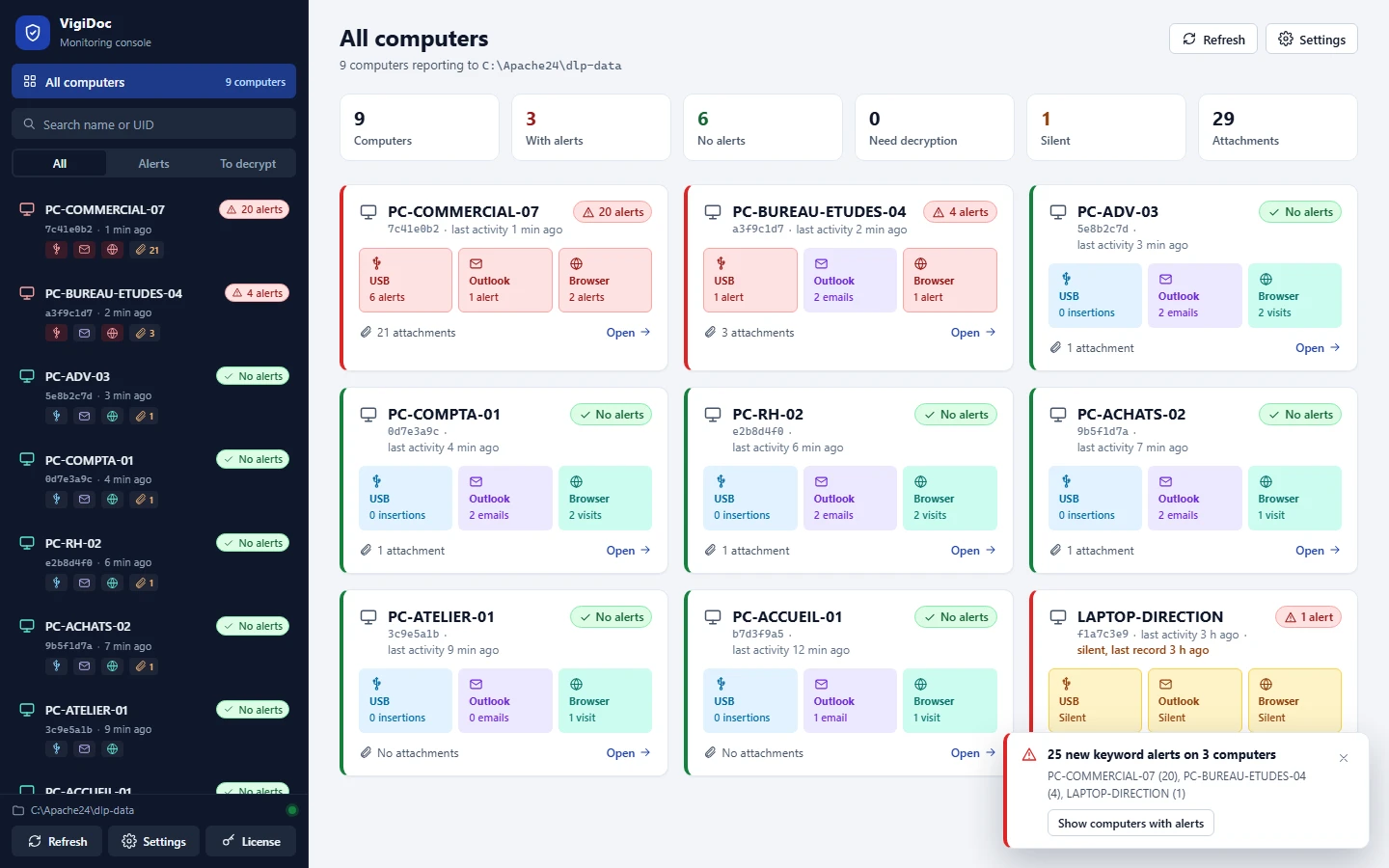
On this channel, an endpoint DLP answers the question that message trace leaves open. VigiDoc captures every email sent from Outlook on equipped computers, with a copy of each attachment, and alerts when a keyword appears in the subject, or in the attachment's name or content.
Webmail, cloud storage and AI: the web service (T1567)
Technique T1567 explains why attackers like web services: computers on the network already communicate with them, firewall rules often let them through, and TLS encryption protects the exchange. Sub-technique T1567.002 mentions Dropbox and Google Docs. Employees use the same services for ordinary reasons, such as a file too large for email or a folder to review at home. ANSSI lists Google Drive, Dropbox and MEGA among the legitimate storage services observed during incidents, and notes that their misuse makes it hard to tell legitimate from malicious traffic.
On the computer, the native trace is browser history. Chrome keeps visited pages for 90 days, except those from private browsing and those the user deleted; Edge keeps a similar history, as does Firefox. The history shows that an upload page was opened at a given time; it does not say which file was uploaded, or even whether one was. MITRE suggests detecting the upload by correlating reads of sensitive files with outbound HTTPS requests to storage domains, which requires a proxy or a detection tool able to see both. An installed sync client (Dropbox, Google Drive for desktop, personal OneDrive) sends files without going through the browser: only its presence, its own logs or a proxy reveal the upload. For two webmail services, VigiDoc goes further than history: in Gmail and Outlook on the web, an extension for Chrome, Edge and Firefox captures each attachment as it is added, with the account, subject and recipients, and sends an encrypted copy to the server. The message text is not read.
Pasting a contract into a consumer AI assistant is the same action from an ATT&CK perspective: an external web service receives data. The new technique T1700 targets something else: a company's own AI agent that an attacker manipulates into exfiltrating data. On the computer, the native trace is limited to the page visit; pasted text appears in no log on the computer. The 2026 DBIR ranks unauthorized AI use as the third most frequent non-malicious action detected by its contributors' DLP tools in 2025, four times more than a year earlier.
FTP, SFTP, curl: the alternative protocol (T1048)
T1048 covers transfers over a protocol the company did not intend for that purpose: FTP, SFTP, SMB to an external share, even DNS. On our Windows 11 test computer (version 26H2), the curl command-line tool is present by default in C:\Windows\System32; a client like WinSCP installs in a few minutes if nothing prevents it. Windows can log the launch of every program with its command line (event 4688), provided two settings that are off by default are enabled: process creation auditing and including the command line in those events. Windows Firewall can also keep a log of allowed connections, which was disabled on all three profiles of our test computer.
Without these settings, and without a proxy or perimeter firewall that logs, an FTP transfer only leaves execution traces on the computer that a digital forensics expert may or may not be able to recover. This channel mostly concerns technical staff. The 2026 DBIR notes that developers and system administrators are among the perpetrators of access misuse, with broader rights than average. VigiDoc does not monitor this channel.
Archiving and splitting before exfiltration (T1560, T1030)
Before they leave, files are gathered. MITRE's case knowledge base describes hundreds of files downloaded from shared spaces, staged on the computer (T1074) or in an archive (T1560). Technique T1560.001 mentions 7-Zip, WinRAR and WinZip, and notes that Windows can also compress files on its own. A password-protected archive encrypts its content: no tool that reads files can read the text any more, and only the archive's name, size and path remain visible. On the Windows side, archiving leaves at best a 4688 event if process auditing is enabled, and the archive name in a 4663 event if it goes to a monitored USB drive.
Splitting (T1030) is a response to another control: volume thresholds. A 200 MB send becomes ten 20 MB sends; an archive becomes ten numbered volumes. Each chunk keeps its own trace: ten lines in message trace, ten files copied to the USB drive. The technique can fool a rule that counts bytes, but far less easily a rule that counts events or an analyst who reads the list.
VigiDoc logs every copied file and every attachment, whatever its size, and looks for its keywords in the content of .txt, .pdf, .docx and .xlsx files and .zip archives. An encrypted archive, another archive format or the volumes of a split archive therefore leave with their name, time and copy, without an alert on their content. A keyword in their name is enough to flag them, and a protected archive that goes to a USB drive the day before someone leaves stands out in the list.
Screenshots, photos, printing: what leaves no file
Screen capture (T1113) belongs to the Collection tactic: it turns a document into an image, which will later leave through another channel. MITRE notes that it "cannot be easily mitigated with preventive controls", because it relies on a normal system feature. On Windows 11, the Snipping Tool saves every screenshot to the Pictures\Screenshots folder by default, according to Microsoft's help; the Print Screen key puts the image on the clipboard. The folder can be emptied in a single action, and clipboard history, off by default, was off on our test computer.
A photo of the screen taken with a personal phone leaves no trace on the computer. No tool installed on the computer will see it: only office layout and awareness training address it.
Printing is not in ATT&CK, but it is an exit channel in its own right, which several DLP products treat as a separate activity. Windows can record each print job in the Microsoft-Windows-PrintService/Operational log (event 307); this log was disabled on our test computer, which is the default configuration. A print server or a copier with job accounting sometimes keeps its own trace. These three paths are also the ones a visible block pushes a determined person toward, as we explain in Detect rather than block.
Automated exfiltration (T1020)
T1020 describes an exfiltration that runs on its own once set up. For an employee, it takes two simple forms. The first is a script or scheduled task that copies a folder to a USB drive or a share every evening. Windows can log the creation of the task (event 4698, which contains its name and full definition) if Other Object Access Events auditing is enabled; the Task Scheduler log, which records its runs, was disabled on our test computer. For VigiDoc, a copy to a USB drive made by a script is a copy like any other: it appears in the computer's USB section.
The second is an inbox rule that forwards incoming messages to a personal address, which MITRE classifies under T1114.003. In Exchange Online, automatic forwarding to external addresses has been disabled since 2021 for new organizations and for those that were not actively using the default setting; Microsoft advises setting it explicitly rather than relying on automatic mode. The auto-forwarded messages report and message trace show the accounts involved. A rule executed by the server does not go through Outlook on the computer: you have to look for it on the mail side.
Native traces to enable before you need them
All these traces have one thing in common. They only cover events after they were enabled, and nothing can be recovered retroactively. The settings below are free; together, they cover a good part of the table, provided someone collects and reads the logs.
- Removable storage and PNP activity auditing (events 4663 and 6416): the list of files written to a USB drive and the history of recognized devices. Instructions in our tutorial on removable storage auditing.
- Process creation auditing, with the command line (event 4688): curl, 7-Zip, WinSCP and scripts appear with their arguments. Command lines can contain sensitive information: restrict log access to authorized people.
- Other Object Access Events auditing (event 4698): the creation of scheduled tasks.
- Microsoft-Windows-PrintService/Operational log: print jobs, computer by computer or on the print server.
- Log size and collection: the Security log is capped at 20 MB by default and overwrites old events; central collection keeps the trace of an entire notice period.
- External automatic forwarding in Exchange Online: set explicitly, with the forwarded messages report checked from time to time.
- Portable devices (WPD) policy: decided at the same time as the USB drive policy, so the phone does not remain an obvious way out.
These settings still do not tell you what the files contained. That is the common limit of native traces, and the reason for a DLP that keeps a copy.
The view from an offensive team
In internal penetration tests, SSHack starts from an ordinary computer and account and looks for ways a file can get out. The order of attempts is almost always the same: the USB drive, personal webmail opened in the browser, a consumer storage or file transfer service, then the encrypted archive that makes the content unreadable to tools. If those paths are closed or too visible, next come the phone in MTP mode, printing and screenshots. At each step, we care less about whether the transfer succeeded than about the trace it leaves, and how long it would take the client's team to find it. In most fleets, the answer depends on settings decided months earlier: auditing enabled or not, logs collected or overwritten, someone to read them. That is also why we recommend detecting first: a channel monitored silently keeps the perpetrator on a visible path.
What VigiDoc adds, and what it misses
VigiDoc, SSHack's DLP software for Windows endpoints, covers several channels in the table in more detail than Windows. On USB drives and external disks, it logs insertion and removal and every file copied or overwritten, and keeps an encrypted copy of the file. In Outlook, it captures every email sent with a copy of the attachments. In Gmail and Outlook on the web, an extension captures each attachment as it is added, with the account, subject and recipients. In Chrome, Edge and Firefox, it records the address, title and time of pages visited, with no extension to install. It alerts when a keyword you defined appears in a file name or content, an email subject, or a page address or title; our keyword lists by industry are ready to test. Copies and logs stay encrypted on a server hosted on your premises. Users work normally: nothing is interrupted.
Its blind spots are those in the table: printing, screenshots and photos, a phone in MTP mode, FTP transfers or transfers through a sync client. Add text typed into webmail, attachments in webmail other than Gmail and Outlook on the web, files uploaded or text pasted into online storage or an AI tool (only the visit appears), private browsing, and the content of password-protected archives (only the fact that they left is recorded). VigiDoc is not retroactive: to know, the next time you have doubts, which files left by USB drive or email, it has to be installed beforehand. The 30-day trial starts as soon as you install the server, with no license to request.
The legal framework
Every trace in this guide concerns people's activity. Before enabling auditing or installing a DLP, check your local employment and data protection law. In France, for example, article L1222-4 of the Labor Code requires employees to be informed, the CNIL (France's data protection authority) requires a setup proportionate to its purpose, and the works council (CSE) is consulted in companies with 50 or more employees. The IT acceptable use policy is the right place: it states that data transfers are monitored, without listing the alert keywords. For a specific case, an internal investigation or legal proceedings, consult a lawyer; this page describes techniques, not a legal position. If you already have doubts, our first-48-hours protocol (in French) explains how to preserve traces before they are overwritten.
Frequently asked questions
What is data exfiltration?
It is the unauthorized transfer of data out of a system or an organization, by an external attacker or by an insider. MITRE ATT&CK treats it as a tactic (TA0010) with ten techniques in version 20, released in October 2026, including exfiltration over a physical medium such as a USB drive (T1052), over an alternative protocol such as FTP (T1048) and over a web service such as cloud storage (T1567).
Which MITRE ATT&CK techniques apply to an employee's workstation?
Four exfiltration techniques describe actions possible from a workstation: physical medium (T1052, including T1052.001 for USB), alternative protocol (T1048), web service (T1567, including T1567.002 for cloud storage) and data transfer size limits (T1030). Add automated exfiltration (T1020) and two collection techniques that prepare the exfiltration: archiving (T1560) and screen capture (T1113).
Does Windows keep a record of files uploaded to Dropbox, Google Drive or webmail?
Not of the files. Browser history keeps the address, title and time of pages visited, for 90 days in Chrome, excluding private browsing and deleted pages. It shows that an upload page was opened, not what was uploaded. An installed sync client sends files without going through the browser; only its own logs, or a proxy, keep a record of them.
Does a screenshot or a photo of the screen leave a trace?
A screenshot taken with the Windows 11 Snipping Tool is saved by default in the Pictures\Screenshots folder, which the user can empty. A photo of the screen taken with a phone leaves no trace on the computer. MITRE considers screen capture hard to mitigate with preventive controls, and no tool installed on the computer sees the photo.
What does a detection DLP like VigiDoc see, and what does it miss?
VigiDoc records files copied to a USB drive or external disk, with an encrypted copy, emails sent from Outlook with their attachments, attachments added in Gmail and Outlook on the web, and pages visited in Chrome, Edge and Firefox, and alerts on keywords. It does not see printing, screenshots, a phone connected in MTP mode, text pasted into webmail or an AI tool, or the content of password-protected archives, of which only the transfer is recorded.
Sources
- MITRE ATT&CK, Exfiltration tactic (TA0010), version 20 released on October 13, 2026: ten techniques, including T1700 AI-Enabled Exfiltration, accessed October 2026.
- MITRE ATT&CK, version 20, exfiltration techniques: T1052 Exfiltration Over Physical Medium (which mentions phones) and T1052.001; T1048 Exfiltration Over Alternative Protocol; T1567 Exfiltration Over Web Service and T1567.002 (detection strategy DET0570); T1030 Data Transfer Size Limits; T1020 Automated Exfiltration.
- MITRE ATT&CK, version 20, collection techniques: T1560.001 Archive via Utility; T1113 Screen Capture ("cannot be easily mitigated with preventive controls"); T1114.003 Email Forwarding Rule.
- MITRE Center for Threat-Informed Defense, Insider Threat TTP Knowledge Base, version 2.0.0, case analysis, 2024: "Exfiltration" section (batches of more than 500 files, archiving, frequency of T1052.001).
- ANSSI, Cyber Threat Overview 2025 (Panorama de la cybermenace 2025) (CERTFR-2026-CTI-002), in French, March 2026: 196 exfiltration incidents versus 130 in 2024, 80 confirmed claims (page 13); legitimate tools and services observed during incidents, including Google Drive, Dropbox and MEGA (pages 25 to 27).
- Verizon, 2026 Data Breach Investigations Report, incidents from November 1, 2024 to October 31, 2025, Privilege Misuse pattern (pages 57 to 60): 1,141 incidents, 766 of them with confirmed data disclosure, motives, example of sending to personal email, unauthorized AI.
- Microsoft Learn, Message trace in the new EAC in Exchange Online, updated September 16, 2026; Message tracking (Exchange Server 2016, 2019 and Subscription Edition).
- Microsoft Learn, Control external email forwarding, updated August 18, 2026.
- Microsoft Learn, Command line process auditing (event 4688); 4698(S) A scheduled task was created.
- Microsoft Support, Use Snipping Tool to capture screenshots, accessed October 2026.
- Google, Chrome Help, check or delete your browsing history: pages visited in the last 90 days, excluding private browsing and deleted pages.
- SSHack checks on a Windows 11 Pro 26H2 computer (build 26300), account without administrator rights, October 2026: PrintService/Operational and TaskScheduler/Operational logs disabled, firewall log disabled on all three profiles, curl.exe present in System32, clipboard history not enabled.
- French Labor Code, article L1222-4 (in French); CNIL, le contrôle de l'activité des personnes employées (monitoring employee activity, in French).