Checklist
Employee offboarding: the security checklist for the last 30 days
Resignation, mutual termination, end of a fixed-term contract or dismissal: between the announcement and the last day, the employee keeps their access, their files and their mailbox. This printable checklist tells you what to check, when, and exactly where to look (console, PowerShell command, log) to catch departing employee data theft. It is written by SSHack, an offensive security firm and the publisher of the VigiDoc DLP software.
In brief
The security side of an employee departure comes down to four stages: as soon as it is announced, inventory their access and data; during the notice period, check what goes out (USB drives, email to a personal address, forwarding rules, web uploads, downloads); on the last day, cut all access and collect the equipment; after the departure, keep the logs and look for forgotten access. The HR side of a departure does not protect data: this checklist covers the security side, with the exact place to check each item. Microsoft 365 and Windows keep useful traces, but some disappear after 7 to 30 days, and none of them lists the files copied to a USB drive unless auditing was enabled beforehand. These checks are done within the framework already announced to employees, proportionately.
To print it or save it as a PDF: Ctrl + P. Only the article is printed, with its checkboxes.
Why the notice period is the time to watch
During a notice period, the employee works normally, with their access, their computer and their mailbox. They know what the customer files, price lists and plans are worth. Taking data out requires no technical skill: a USB drive, an email to their own address, an upload to a file sharing service.
In France, among the 100 CISOs surveyed by Proofpoint for its Voice of the CISO 2026 report, 36% say their organization suffered a significant data loss (versus 43% in 2025). All of them, 100% of the CISOs concerned, say departing employees played a part. More figures, each with its source, are collected in our page Insider data leaks: the 2026 numbers (in French).
Standard offboarding procedures are written by HR: end-of-contract paperwork, badge return, final pay. On the IT side, they often boil down to "disable the account on the last day". What matters is what happened before, and part of the evidence disappears a few weeks later.
The framework: check without covert surveillance
Before any check
Rules depend on the country: check your local employment and privacy law (GDPR in the EU) before monitoring a departing employee. As an example, in France a system that collects information about an employee must be disclosed to them beforehand (article L1222-4 of the French Labor Code), be justified and proportionate according to the CNIL (France's data protection authority) and, in companies with 50 or more employees, have gone before the works council (CSE). In practice, rely on the IT acceptable use policy already distributed and on logs that already exist; do not secretly install a tool the day someone resigns. Messages and files identified as personal are generally subject to specific rules. For anything involving evidence, disciplinary action or a criminal complaint, talk to your lawyer and HR: this checklist covers the technical side only.
Who does what: HR, IT or security, manager
Nothing works unless information flows between these three roles. In a small business, one person may hold two of them.
| When | HR | IT or security (CISO) | Manager |
|---|---|---|---|
| Announcement | Informs IT the same day: end date, type of departure, any release from working the notice period | Inventories accounts and access; removes unnecessary rights; checks mail forwarding | Lists the employee's folders, data and business tools; organizes the handover |
| Notice period | Hands over a written reminder of the IT policy and the confidentiality obligation | Checks outgoing data every week, within the announced framework | Reports unusual behavior; moves useful files to shared spaces |
| Last day | Has the equipment return form signed | Disables accounts at the agreed time; revokes sessions, MFA and VPN; converts the mailbox | Lists shared accounts and supplier portals the employee knew; takes over their mailbox and files |
| After | Archives the file; brings in the lawyer if a doubt arises | Exports logs; reviews access at D+7 and D+30 | Tells customers and suppliers about the new contact |
Step 1: as soon as the departure is announced
The trigger is the same for every departure: resignation received, mutual termination signed, dismissal notified, end of a fixed-term contract or retirement date set. ANSSI, France's national cybersecurity agency, asks for departure procedures to be defined in coordination with human resources: without a signal from HR on the same day, none of what follows is possible.
- HR has sent IT the name, end date, type of departure and any release from working the notice period. The announcement date is recorded: it bounds every log search.
- Accounts are inventoried: directory (Active Directory, Microsoft Entra ID), email, VPN, remote access, CRM, ERP, SaaS applications, privileged accounts, test accounts. Where to look: their groups (
Get-ADPrincipalGroupMembership -Identity jsmith), the applications assigned to them in Microsoft Entra ID, and the manager's list for tools outside the directory. - Shared accounts whose password they know are listed: admin accounts, company social media, customer and supplier portals, Wi-Fi, door codes.
- Their data is located (local folders, OneDrive, network shares, paper documents) and the equipment to return is listed: PC, phone, badge, keys, hardware MFA token, company USB drives and disks with their serial numbers.
- Rights that no longer serve their duties are removed (admin rights, other departments' shares, projects they are leaving); those needed for day-to-day work stay open.
- Existing mail forwarding is checked right away (see step 2).
- HR has handed over a written reminder of the IT acceptable use policy and the confidentiality obligation, in the versions already in force.
- Monitoring is stepped up within the announced framework: a weekly review of the existing logs for this account, by an authorized person, with no new hidden system.
- Contentious departure or release from working the notice period: go straight to step 3, the same day.
Step 2: during the notice period, channel by channel
Check each item at least once a week, and more often in the last week. Record every check (date, result, who did it). The Exchange Online commands below run after Connect-ExchangeOnline; replace the address with the employee's.
USB drives and external disks
Windows keeps a record of connected drives (USBSTOR registry key, the setupapi.dev.log file, and event 6416 if the Audit PNP Activity policy is enabled). It does not keep the list of copied files, unless removable storage auditing (Audit Removable Storage, event 4663) was enabled before the copy. Details, and what these traces prove or do not prove: How to tell if an employee copied files to a USB drive.
- Drives and disks connected to their computer since the announcement are listed (name, serial number, date). A free read-only script does this: list the USB drives connected to a computer.
- Serial numbers are compared with the company drives issued to them: any unknown drive is noted.
- If 4663 auditing is enabled on the computer: the Security log is filtered on their account and on removable drives.
A phone connected in file transfer mode (MTP) does not get a drive letter: it escapes the controls designed for USB drives.
Emails sent to a personal address
The simplest move is to email attachments to yourself. Exchange Online message trace lists outgoing messages (date, recipient, subject) over 90 days, in 10-day windows. It does not show the content of attachments, but the message size flags a large file. In the Exchange admin center: Mail flow > Message trace, sender equal to their address, outbound direction. In PowerShell:
Get-MessageTraceV2 -SenderAddress firstname.lastname@yourcompany.com -StartDate (Get-Date).AddDays(-10) -EndDate (Get-Date) -ResultSize 5000 |
  Where-Object { $_.RecipientAddress -notlike "*@yourcompany.com" } |
  Sort-Object Received |
Format-Table Received, RecipientAddress, Subject, Size -AutoSize- No messages to consumer email services (gmail.com, outlook.com, yahoo.com…), to an address that looks like their name, or to their future employer's domain if known.
- Large messages, or messages sent in the evening and on weekends, are looked at closely.
- On an on-premises Exchange server, the same search is done with
Get-MessageTrackingLog -Sender.
Personal webmail opened in the browser does not go through Exchange: a file attached from that webmail shows up in none of these logs.
Automatic forwarding rules (Outlook and Exchange)
A rule that forwards all messages, or only those from one customer, to a personal address runs silently until the last day, and sometimes after. There are two mechanisms: inbox rules, created in Outlook or Outlook on the web, and forwarding set on the mailbox itself (ForwardingSmtpAddress), which the user can turn on in Outlook on the web (Settings > Mail > Forwarding).
# Mailbox rules that forward or redirect
Get-InboxRule -Mailbox firstname.lastname@yourcompany.com -IncludeHidden |
  Where-Object { $_.ForwardTo -or $_.ForwardAsAttachmentTo -or $_.RedirectTo } |
  Format-List Name, Enabled, ForwardTo, ForwardAsAttachmentTo, RedirectTo

# Forwarding set on the mailbox itself
Get-Mailbox -Identity firstname.lastname@yourcompany.com |
  Format-List ForwardingSmtpAddress, ForwardingAddress, DeliverToMailboxAndForward

# Rules created or changed in the last 30 days (unified audit log)
Search-UnifiedAuditLog -StartDate (Get-Date).AddDays(-30) -EndDate (Get-Date) -UserIds firstname.lastname@yourcompany.com -Operations New-InboxRule,Set-InboxRule,UpdateInboxRules -SessionCommand ReturnLargeSet- No rule with
ForwardTo,ForwardAsAttachmentToorRedirectTopointing to an external address. ForwardingSmtpAddressis empty.- Their name does not appear in the Auto forwarded messages report in the Exchange admin center (mail flow reports), which covers up to 90 days.
- Once and for all, for the whole organization: in the Microsoft Defender portal (Email & collaboration > Policies & rules > Threat policies > Anti-spam), the outbound spam policy sets external automatic forwarding to Off, except for approved exceptions. According to Microsoft, the Automatic setting does not behave the same way in every organization. Check:
Get-HostedOutboundSpamFilterPolicy | Format-List Name, AutoForwardingMode.
Web uploads and personal cloud storage
WeTransfer, personal Google Drive or Dropbox, webmail: the file leaves through the browser over HTTPS. Without TLS inspection on the proxy, you only see the site name and, depending on the device, the volume sent.
- Proxy or firewall logs: connections from their computer to personal transfer and storage services, with upload volume when the device measures it.
- Browser history on the computer, within the announced framework: visits to upload pages (wetransfer.com, drive.google.com, dropbox.com…).
- Sync apps installed on the computer (personal OneDrive, Google Drive, Dropbox): Settings > Apps > Installed apps.
- On managed computers, the OneDrive policy Prevent users from syncing personal OneDrive accounts (
DisablePersonalSync) is applied, or Allow syncing OneDrive accounts for only specific organizations (AllowTenantList) restricts sync to your organization.
Bulk downloads: SharePoint, OneDrive, CRM, shares
Before copying, you have to gather. A spike in downloads from SharePoint, OneDrive, the CRM or a network share is often the first visible sign. The Microsoft 365 unified audit log records downloads (FileDownloaded) and syncs to the computer by the OneDrive app (FileSyncDownloadedFull). Number of files per day:
Search-UnifiedAuditLog -StartDate (Get-Date).AddDays(-30) -EndDate (Get-Date) -UserIds firstname.lastname@yourcompany.com -Operations FileDownloaded,FileSyncDownloadedFull -SessionCommand ReturnLargeSet -ResultSize 5000 |
  Group-Object { ([datetime]$_.CreationDate).ToString('yyyy-MM-dd') } |
  Sort-Object Name |
Format-Table Name, Count- The number of files downloaded per day shows no spike compared with previous weeks.
- CRM: exports of customer or contact lists are checked in the tool's audit log (each vendor has its own: find it before you need it).
- Windows network shares: access to sensitive folders is checked, provided file access auditing (event 4663) is configured on the server.
Printing
- On the print server (or on the computer, for direct printing), the
Microsoft-Windows-PrintService/Operationallog is reviewed: event 307 records, for each printed document, the user, the printer and the page count. This log must be enabled before you need it.
Where to look, channel by channel
| Channel | Where to check | What is missing |
|---|---|---|
| USB drive, external disk | USBSTOR registry key, setupapi.dev.log, event 6416 | The copied files, unless 4663 auditing was enabled beforehand |
| Email through Exchange | Message trace (90 days), unified audit log | The content of attachments |
| Forwarding rules | Get-InboxRule, Get-Mailbox, auto forwarded messages report | Little, provided you check in time |
| Webmail, WeTransfer, personal cloud | Proxy, firewall, browser history | The name and content of the files sent |
| SharePoint, OneDrive | Unified audit log (180 days) | What happens to the file once downloaded |
| Printing | Event 307 (log must be enabled) | The printed content |
| Photo of the screen with a phone | No trace | Everything |
Depending on your license, Microsoft 365 also offers its own DLP rules; what is and is not included is covered in DLP and Microsoft 365 Business Premium.
Step 3: the last day
Set a time with HR and the manager: access is cut at the end of the final meeting, not the next day. Disabling the account is not enough: according to Microsoft, an access token already issued stays valid until it expires (one hour by default), hence the session revocation.
Accounts, sessions and access
# On-premises Active Directory
Disable-ADAccount -Identity jsmith
Set-ADAccountPassword -Identity jsmith -Reset -NewPassword (Read-Host -AsSecureString "New random password")

# Microsoft Entra ID (Microsoft Graph PowerShell module)
Connect-MgGraph -Scopes "User.ReadWrite.All","Directory.AccessAsUser.All"
$User = Get-MgUser -UserId firstname.lastname@yourcompany.com
Update-MgUser -UserId $User.Id -AccountEnabled:$false
Revoke-MgUserSignInSession -UserId $User.Id
Get-MgUserRegisteredDevice -UserId $User.Id -All | ForEach-Object { Update-MgDevice -DeviceId $_.Id -AccountEnabled:$false }- Active Directory account disabled; password reset twice with a random value (Microsoft recommends this against pass-the-hash reuse).
- Hybrid environment: the disable is synced to Microsoft Entra ID, then sessions are revoked. In the Microsoft Entra admin center: Entra ID > Users > All users, the user, then Revoke sessions.
- Cloud-only account: Account enabled unchecked in the properties, then Revoke sessions.
- MFA methods removed: the user's Authentication methods tab, then Require re-register MFA (removes phones, the Microsoft Authenticator app and software tokens); app passwords deleted if they had any.
- Devices registered to them disabled (last command above). Personal phone with company email: devices listed with
Get-MobileDevice -Mailbox firstname.lastname@yourcompany.com, company data wiped through Intune. - VPN: account or certificate revoked. Remote access closed: remote desktop, remote support tools, supplier portals.
- Passwords of the shared accounts they knew changed (list from step 1), along with door codes.
- Applications outside the directory (SaaS without single sign-on): accounts disabled one by one, based on the step 1 inventory.
Equipment
- PC, phone, tablet, badge, keys and hardware MFA token returned; equipment return form signed.
- Company USB drives and disks returned; their serial numbers compared with the inventory and with the drives seen on the computer during the notice period.
- The PC is neither reimaged nor reassigned: it is kept as is until the step 4 checks are complete.
Mailbox and files
Microsoft suggests converting the mailbox to a shared mailbox: the manager or successor can access it, and the license can be removed if the mailbox is under 50 GB. Microsoft documents two pitfalls. Inbox rules are kept after the conversion, so a forwarding rule keeps working. And if the password is not reset, the old username and password still give access to the shared mailbox.
Set-Mailbox -Identity firstname.lastname@yourcompany.com -Type Shared
Add-MailboxPermission -Identity firstname.lastname@yourcompany.com -User manager@yourcompany.com -AccessRights FullAccess -InheritanceType All- Forwarding rules deleted before the conversion (
Remove-InboxRule, or Outlook on the web). - Mailbox converted while its license is still assigned: Exchange admin center, Recipients > Mailboxes, the mailbox, then Convert to shared mailbox.
- Access given to the manager or successor. The user account stays blocked but is not deleted: it anchors the shared mailbox.
- Long-term retention: a Microsoft 365 retention policy or litigation hold applied before any account deletion (the mailbox then becomes inactive). On a shared mailbox, litigation hold requires an Exchange Online Plan 2 license, or Plan 1 with Exchange Online Archiving.
- Local files and OneDrive handed over to the manager. When the account is deleted, the manager gets access to the OneDrive for 30 days by default, if access delegation is enabled in the SharePoint admin center.
Step 4: after the departure
Microsoft 365 logs have short default retention periods. A doubt can surface weeks later (a customer who leaves, a competitor who answers a tender with your prices): export the logs before they disappear. Deleting the account also starts the countdown for the mailbox and the OneDrive.
| Log | Default retention | Where to view it |
|---|---|---|
| Entra ID sign-in logs | 7 days (Entra ID Free), 30 days (P1 or P2) | Microsoft Entra admin center, Sign-in logs |
| Unified audit log (Audit Standard) | 180 days | Microsoft Purview portal, Audit solution, or Search-UnifiedAuditLog |
| Exchange Online message trace | 90 days, searchable in 10-day windows | Mail flow > Message trace, or Get-MessageTraceV2 |
| Auto forwarded messages report | 90 days (summary page) | Mail flow reports in the Exchange admin center |
| Mailbox of a deleted account, no hold | 30 days | Microsoft 365 admin center (restore the user) |
| OneDrive of a deleted account | 30 days by default, configurable | SharePoint admin center |
- D+1: sign-in and audit logs for the account exported to CSV for the whole notice period, filed with the equipment return form.
- D+1: no successful sign-in after the cut-off time in the Entra ID sign-in logs.
- D+7: review of residual access: SaaS applications outside the directory, test or service accounts they created, API tokens, anonymous sharing links they created to company files.
- D+30: new review of sign-ins and accounts; file closed in writing (what was checked, when, by whom).
- Before any account deletion: written decision on keeping the mailbox and the OneDrive.
If a doubt arises
A suspicious email, a download spike, an unknown USB drive: do not confront the employee and do not touch the computer. The first hours are for preserving evidence (computer set aside, mailbox placed on hold, logs exported), then rebuilding the timeline before handing over to a lawyer. The detailed protocol: Employee data theft: the first 48 hours (in French).
What VigiDoc adds during a notice period
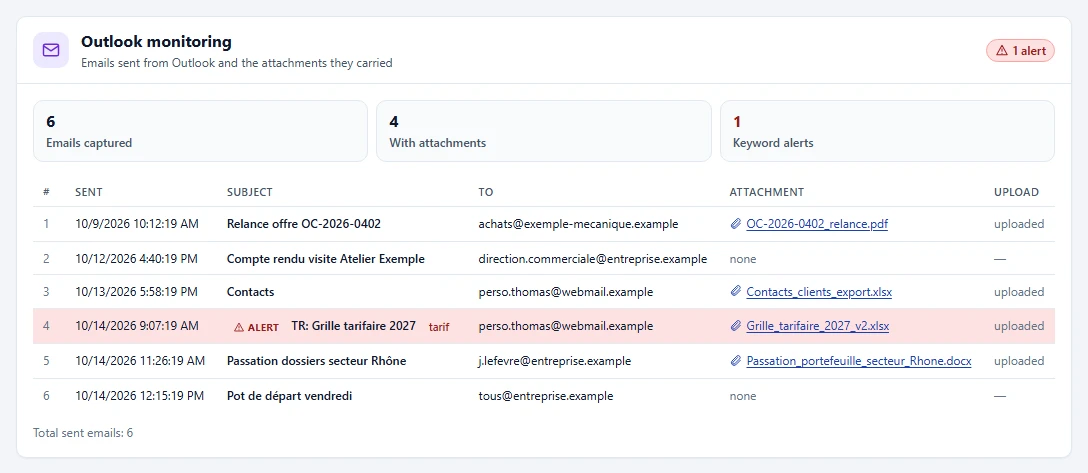
Native logs tell you that a drive was plugged in or that an email went out; they do not tell you which files. VigiDoc, detection-only DLP software for Windows endpoints, logs every file copied to a USB drive or external disk and keeps an encrypted copy, captures emails sent from Outlook with their attachments and the attachments added in Gmail and Outlook on the web, and collects Chrome, Edge and Firefox browsing history. An alert appears in the Dashboard when a keyword you defined (a customer name, a project name, "confidential") shows up in a copied file, an email subject, an attachment or a visited page. It detects and alerts, without blocking anything.
Its limits, stated plainly: among webmail services, it only sees Gmail and Outlook on the web attachments, not the message text; it does not see content uploaded to WeTransfer (only the page visit), printing, cloud sync or phones in file transfer mode. It does not look back in time, except for the last 7 days of Outlook email: install it across your fleet, within the framework announced to employees, before the next departure. Logs and captured files stay on your server. To see what goes out during the next notice period, try VigiDoc for 30 days.
Frequently asked questions
Should you cut an employee's access as soon as they announce their departure?
Not all of it: during the notice period, the employee is still working and needs part of their access. Remove right away what no longer serves their duties (admin rights, other departments' shares, unnecessary remote access), then cut everything on the last day, at the time agreed with HR. For a contentious departure or when the employee is released from working their notice, cut access the same day.
How can you tell if an employee is forwarding their email to a personal address?
In Exchange Online, Get-InboxRule lists the rules in their mailbox, and Get-Mailbox shows forwarding set on the mailbox itself (ForwardingSmtpAddress). The auto forwarded messages report in the Exchange admin center shows forwarding to external domains over 90 days. Emails sent manually to a personal address appear in message trace, without the content of the attachments.
Can you find out which files an employee copied to a USB drive before leaving?
Not with the traces Windows keeps by default: they show which drive was plugged in and when, not which files were copied. Removable storage auditing (event 4663) must have been enabled before the copy, or a tracking tool such as DLP software must have been running during the notice period.
What should you do with a departing employee's mailbox?
In Microsoft 365, the usual approach is to convert it to a shared mailbox and give access to the manager or successor. Reset the account password, because the old one still gives access to the shared mailbox, and delete forwarding rules, which are kept after the conversion. Without a license, a shared mailbox is limited to 50 GB.
Is it legal to monitor an employee during their notice period?
It depends on your country's employment and privacy law (GDPR in the EU). In France, it is allowed within the framework already announced to employees: the system must have been disclosed to them beforehand (article L1222-4 of the French Labor Code), stay proportionate to its purpose and, in companies with 50 or more employees, have gone before the works council (CSE). Before using the logs as evidence or for disciplinary action, consult a lawyer.
How long should you keep logs after an employee leaves?
As long as needed to clear up any doubt, within the retention period announced to employees. Microsoft 365 default retention periods are short: 7 or 30 days for Entra ID sign-ins depending on the license, 90 days for message trace, 180 days for the audit log. Export whatever expires before your checks are complete.
Sources
- Proofpoint, Voice of the CISO 2026, French press release of September 9, 2026 (100 CISOs surveyed in France).
- ANSSI, IT hygiene guide (Guide d'hygiène informatique, in French), version 2.0, September 2017, measure 6 "Organize procedures for users' arrival, departure and change of role".
- French Labor Code, article L1222-4 (prior notice to employees, in French).
- CNIL, Work and human resources: monitoring employee activity (in French), July 9, 2026.
- CNIL, Monitoring internet and email use (personal messages and files, in French).
- Microsoft Learn, Revoke user access in an emergency in Microsoft Entra ID (AD and Graph commands, token lifetime).
- Microsoft Learn, Manage authentication methods for Microsoft Entra multifactor authentication.
- Microsoft Learn, Get-InboxRule, and New-InboxRule (ForwardTo, ForwardAsAttachmentTo, RedirectTo parameters).
- Microsoft Learn, Control external email forwarding, and Auto forwarded messages report.
- Microsoft Learn, Message trace in the new EAC, and Get-MessageTraceV2.
- Microsoft Learn, Search-UnifiedAuditLog, Audit log activities and Get started with auditing solutions (180-day retention).
- Microsoft Learn, Microsoft Entra data retention.
- Microsoft Learn, Convert a user mailbox to a shared mailbox, and Learn about inactive mailboxes.
- Microsoft Learn, Remove a former employee, and OneDrive retention and deletion.
- Microsoft Learn, Use OneDrive policies to control sync settings (DisablePersonalSync, AllowTenantList).
- Microsoft Learn, Audit Removable Storage, and event 6416.
- Microsoft Learn, [MS-RPRN] RPC_BranchOfficeJobDataPrinted (event 307 in the PrintService/Operational log).