Guide
ChatGPT and consumer AI at work: what a DLP sees, and what it doesn't
A salesperson pastes a draft contract into ChatGPT to get a summary. A developer submits a function that keeps crashing. An assistant uploads a customer spreadsheet to remove duplicates. None of them thinks they are taking data out. This guide brings together the published figures, OpenAI's terms on reusing conversations, what a detection-based DLP (data loss prevention) tool sees of these uses and what it misses, and then a five-step method for an SMB. It is written by the team at SSHack, an offensive security firm and the publisher of VigiDoc.
Key takeaways
According to Verizon's 2026 DBIR, which draws on its contributors' DLP tools, 45% of employees now use AI regularly on their work devices, up from 15% a year earlier, and 67% of users go through a non-corporate account. In France, 91% of the chief information security officers (CISOs) surveyed by Proofpoint fear customer data loss through public generative AI tools. An endpoint DLP that reads browser history sees the visit to chatgpt.com or claude.ai, with the time and the device, and can raise an alert on the name of the service; it does not see the pasted text, the uploaded file or the answer. That trace helps you measure actual use, choose the tool to provide and write a rule that employees can follow.
The figures
Three sources, three angles: events detected by DLP tools (Verizon), statements from CISOs (Proofpoint), and statements from a regulated profession (the CNB, France's national bar council). Each one is given with its edition and scope.
45%
of employees use AI regularly on their work devices, whether authorized or not; a year earlier, the figure was 15%.
Verizon, Data Breach Investigations Report 2026 · contributors' DLP data, 2025, worldwide
67%
of users access AI services with a non-corporate account from their work device; 72% the previous year.
Verizon, DBIR 2026 · same scope
91%
of French CISOs surveyed are concerned about customer data loss through public generative AI tools; 92% think employees may use AI in ways that expose sensitive data.
Proofpoint, Voice of the CISO 2026 · 100 French CISOs, organizations with 1,000+ employees, May 2026
1 in 10
lawyers trusts generative AI to guarantee data protection; among firms that use it, 23% rely only on general-purpose tools.
CNB, Les cahiers de l'Observatoire, L'intelligence artificielle, 2025 · 4,457 lawyers surveyed
Verizon's figure must be read with its definition: a regular user is someone who opens an AI platform at least once every fifteen days, and the measurements come from contributors' DLP tools, so from companies that are already equipped. The sample does not represent French SMBs. The same report ranks unauthorized AI use third among the non-malicious insider actions detected in 2025, with a share four times higher than a year earlier. It also counts more than 15% of users with an unauthorized AI browser extension in the average organization.
Proofpoint's figure comes from a vendor survey: it measures stated concern, not observed leaks. In the same survey, 95% of French CISOs say they block or restrict the use of generative AI tools, and 90% consider their controls effective. Those answers sit alongside the 67% of personal accounts measured by Verizon. For broader statistics, see our 2026 statistics page, generative AI section (in French).
The uses that take data out
Based on the DLP events analyzed by Verizon, source code is by far the most common type of data sent to external AI tools, ahead of images and other structured data. In 3.2% of these events, it was technical and research documentation. Translated into everyday office tasks, the list is familiar.
- Source code pasted to fix an error. The function, the error message, sometimes the configuration file with its connection strings. It carries no "confidential" marking and no customer name, which makes it hard to spot after the fact.
- The contract or letter to summarize. The whole text goes out, with the names of the parties, the amounts and the clauses. A partner interviewed by the CNB sees the profession's biggest risk in "dumping [documents] into ChatGPT, for example" (our translation).
- The spreadsheet to clean up. A sales export, a salary list, a patient file, to deduplicate or sort. This is Verizon's "structured data", and often personal data.
- The screenshot. A business application, a dashboard or a drawing, uploaded to get an explanation. The image contains everything that was on screen.
- The technical document to translate. A specification, a test report, an R&D memo: the category that touches on know-how. Our page on manufacturing and engineering firms (in French) details the documents involved.
None of these actions is malicious, which is exactly why they are so common. Employees use the most convenient tool available to them, often because the company does not provide one. In its 2025 cyber threat overview, ANSSI (France's national cybersecurity agency) notes that integrating generative AI services into workflows is likely to increase the attack surface "in the absence of physical or usage-level separation" (our translation).
Samsung, 2023: a case reported by the press
In May 2023, Samsung banned generative AI on company computers, tablets and phones and on its internal networks, after discovering that employees had uploaded internal source code to ChatGPT. The information comes from an internal memo reported by Bloomberg and picked up by the French press. The exact nature of the code was not made public. The case illustrates the top use measured by Verizon, and a common reaction among large companies: ban first.
Where the text goes: personal or business account
Once pasted, the text is processed on the service provider's servers. What happens next depends on the type of account, and this is where the 67% of non-corporate accounts becomes meaningful. We read the pages of OpenAI, the company behind ChatGPT, on October 21, 2026; other services have their own terms, to be read the same way.
| Account type | Model training | What the company controls |
|---|---|---|
| Individual plan (Free, Go, Plus, Pro) | Possible: the European privacy policy states that OpenAI may use the content provided to train its models, unless the user turns off the "Improve the model for everyone" setting | Nothing: the account belongs to the employee, who keeps it, with its full history, after leaving |
| Temporary chat, on an individual plan | No, according to OpenAI; the conversation may be kept for up to 30 days for safety reasons | Nothing: it is the user's choice, one conversation at a time |
| Use without an account | Possible; according to OpenAI, the training setting can be turned off in Settings, and the choice is saved in that browser | Nothing |
| ChatGPT Business, Enterprise or Edu | Not by default: OpenAI states that it does not use the content of these workspaces to train its models | The contract, the workspace, the user accounts and, depending on the plan, the retention period |
Two practical consequences. Banning "ChatGPT" without distinguishing between accounts makes little sense, because the main risk lies in the personal account; providing a business account covered by a contract changes the situation more. And the training setting of a personal account depends on each employee, whose history follows them when they leave the company: a contract summarized on a Tuesday is still readable in their account months later.
French authorities give the same advice. Generative AI fact sheet no. 4, published by France Num (the French government's digital program for small businesses) and the CNIL for very small businesses and SMBs (November 2024), states that anything entered into consumer online tools may be used as training data. It asks users not to enter confidential, personal or strategic data into them. In its first answers on deploying generative AI (July 18, 2024), the CNIL recommends favoring local, secure and specialized systems and, failing that, checking whether the provider can reuse the data entrusted to it. Whether a pasted text constitutes a personal data breach under the GDPR is decided case by case, with your data protection officer. For professional secrecy, see our page on law firms (in French).
What built-in tools see
Without a dedicated tool, an SMB sees next to nothing of this use. Windows keeps no usable log of text pasted into a web page, and its event logs do not record site visits. Browser history stays on each device, nobody looks at it, and the user can delete it. The DLP included in Microsoft 365 Business Premium covers Exchange, SharePoint and OneDrive, not workstations (see DLP and Microsoft 365 Business Premium). A firewall or proxy can record the domains contacted, if someone reads those logs. In every case, the pasted text remains invisible.
What an endpoint DLP sees
A detection-based DLP tool such as VigiDoc collects the Chrome, Edge and Firefox browser history on each Windows device, with no extension to install: for each page visited, the URL, the title and the time, linked to the device. Applied to consumer AI, that gives modest but reliable information.
- Who uses what. Visits to chatgpt.com, claude.ai, gemini.google.com, chat.mistral.ai, copilot.microsoft.com or perplexity.ai show up device by device, with the time. After a month, you know which services are used, and on how many devices.
- How often, and when. One visit a week or forty a day, during the day or at 11 p.m.: the pattern shows in the device's timeline.
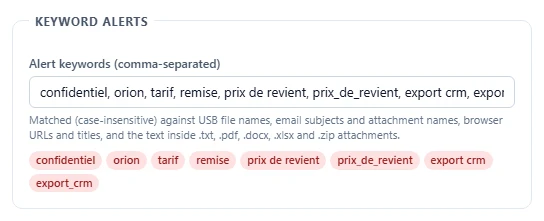
- An alert on the name of the service. If "chatgpt" or "claude" is in your keyword list, every visit is flagged in the Dashboard. Depending on the service, the page title sometimes reflects the conversation title, where a business keyword may appear; this behavior depends on the service and can disappear without notice.
- Other transfers from the same device. The other agents log copies to USB drives, emails sent from Outlook and attachments added in Gmail and Outlook on the web, with an encrypted copy of the files. If the output produced by the AI from a customer file is then sent as an attachment to a personal address, the email and the attachment are captured.
What it doesn't see
This list is longer than the previous one. Better to know it before buying a tool.
- The pasted text and the answer. A tool that reads browser history knows the page, not what was typed or pasted into it, nor what the AI answered.
- The uploaded file. A document dropped into the chat window leaves through the browser, like a file sent through a transfer service or webmail; only the page visit is logged.
- Desktop apps and built-in assistants. The ChatGPT app for Windows, an assistant built into a word processor or a development environment, an AI extension installed in the browser: none of these goes through the history of visited pages.
- Private browsing. A page opened in a private window is not recorded in the history.
- The phone. A photo of a screen uploaded to an AI app from a personal phone escapes any tool installed on the endpoints, as does printing.
- Unsupported browsers and unmanaged devices. A browser other than Chrome, Edge or Firefox, a personal computer, a device outside the managed fleet: no trace.
Two mistakes to avoid. A visit trace establishes that a service was opened; it says nothing about what was entrusted to it. And a content-inspection tool does not cover everything: DLP tools that analyze text typed into the browser require an extension or a proxy that decrypts traffic, and they do not see the phone either. The choice between these approaches is discussed in our guide DLP software: definition, how it works and how to choose.
Governing use without banning blindly: five steps
The CNIL sets out the framework in its July 2024 answers: govern use with a list of permitted and prohibited uses, train users, and involve the data protection officer, IT, the CISO and business teams from the start. The method below applies it to an SMB.
- Measure for a month. After informing employees (see below), add the names of AI services to your keywords and let it run. You get the services in use, the number of devices and the teams involved. The goal is to identify a need, not to find a culprit.
- Classify the data. Write down on one page what must never go to an external service: source code, health data, HR data, customer files, cost prices, classified documents, material covered by professional secrecy. The DGSI (France's domestic intelligence service) more broadly recommends classifying data according to its level of sensitivity; that comes before any rule on AI.
- Provide a tool. Heavy use reveals a real need. A business account whose contract excludes training, a service hosted in Europe or a model installed on your own servers: the choice depends on your data. An employee who has an authorized tool has fewer reasons to open their personal account.
- Write the rule and train people. One page appended to the IT acceptable use policy: the authorized tools, the data that is off-limits whatever the tool, the instruction to pseudonymize before pasting, what to do after a mistake. The France Num fact sheet calls for a document describing what employees can do with the system, with sample prompts. One hour of training per team, with examples from their own work, is worth more than a memo.
- Review every month, then restrict what remains. Are visits to unauthorized services going down now that a tool is available? Who keeps using them, and why? For services that remain problematic, filtering at the proxy or firewall is a legitimate measure in its own right; it is decided once use has been measured, on a precise scope. Our view on choosing between these two approaches is in Detect rather than block.
The order matters. A ban announced before measuring often hits the wrong service and moves usage to personal phones, where nothing is visible anymore.
Bad practices, and what they expose
The table below can serve as the basis for the policy page in step 4. The last column shows what a detection-based DLP reveals when the practice happens on an equipped Windows device.
| Practice | Why it happens | What it exposes | What VigiDoc shows |
|---|---|---|---|
| Source code pasted into a personal account to fix an error | Real time savings, no assistant provided | Code, keys and connection strings at a third party, in a history the developer keeps after leaving | The visit to the service (URL, title, time), flagged if its name is a keyword; not the pasted code |
| Customer contract or letter summarized by a free AI tool | Long documents, tight deadlines | Names, amounts, clauses; possible reuse for training depending on the account's terms | The visit to the service; not the text |
| Customer export or HR file uploaded to be cleaned up | Spreadsheet skills gap, urgent request | Personal data at a third party with no contract; whether it is a data breach is a question for the DPO | The visit to the service; not the uploaded file. If the file was first copied to a USB drive or sent through Outlook, those transfers are logged |
| Blanket ban with no tool provided | Reaction to an article or an incident | Usage moves to phones or private browsing, so it becomes invisible | Fewer visits in the history, which does not prove less use |
Seen by an offensive team
During an internal penetration test, once it has taken control of a device, the SSHack team first looks at what the browser keeps open: email sessions, online storage, management tools and now AI services. An AI session left logged in gives access to the account's full conversation history, meaning everything its owner has pasted into it for months: contract excerpts, pieces of code, spreadsheet exports, screenshots. For an attacker, it is a summary of the company written by its own employees, sorted by date. On a personal account, the company has no way to revoke access when the employee leaves, purge the history or enforce two-factor authentication.
The second reflex is to look for what the company monitors. An AI service blocked at the proxy tells us that the rule exists and points us to the next service, the one nobody thought to block. Discreet detection, by contrast, keeps us on the path the company is watching. That is why we recommend detecting first, then blocking only the critical cases. Here, the critical cases are source code and research documents. They call for a provided tool and a written rule; a list of sites to block will always be one service behind.
What VigiDoc sees, and what it doesn't
VigiDoc, SSHack's detection-based DLP software for Windows endpoints, collects Chrome, Edge and Firefox history on each device, with no extension to install: the URL, title and time of every page visited, for all user accounts on the device. Add the names of AI services to your keywords, and every visit to chatgpt.com, claude.ai or gemini.google.com is flagged in the Dashboard, device by device. The same agent logs copies to USB drives and emails sent from Outlook, with an encrypted copy of the files on a server installed on your premises. Our common baseline of keywords is a good starting point. It does not block anything: you measure actual use before deciding.
Its limits are precise. It does not see text pasted into an AI tool or a webmail, the file uploaded to an AI tool, or the answer: only the page visit is logged. Desktop apps, browser extensions, private browsing, phones, printing, screenshots and the contents of password-protected archives are also out of its sight. The 30-day trial starts as soon as the server is installed, with no license to request, and covers the measurement month in step 1.
Inform employees, stay proportionate
Recording visits to AI services means collecting information about employee activity. In France, article L1222-4 of the French Labor Code requires employees to be informed beforehand of any system that collects information about them. The CNIL (France's data protection authority) also requires the system to be proportionate to its purpose and, in companies with 50 or more employees, the works council (CSE) must be consulted. Other countries have their own rules: check your local employment and data protection law. In practice, the IT acceptable use policy states that browsing history on company devices is recorded and that alerts cover certain services; it does not list the keywords.
Proportionality also applies to how the trace is used. A single visit justifies no disciplinary meeting; heavy use of a personal account by a team that handles source code or health data justifies a conversation, then a tool. For an individual situation that turns into a dispute, consult a lawyer: this page describes facts and tools, not a legal position.
Frequently asked questions
Is pasting text into ChatGPT a data leak?
At the very least, it is data leaving the company: the text leaves the device and the organization to be processed, and sometimes stored, on a third party's servers, depending on the service's terms. The generative AI fact sheet for small businesses published by France Num and the CNIL (France's data protection authority) states that whatever is entered into consumer online tools may be used for training. Confidential, personal or strategic data should therefore not be entered into them. If the text contains personal data, whether it counts as a breach under the GDPR is a question to settle with your data protection officer.
Are conversations from a personal ChatGPT account used to train the models?
According to OpenAI's help center, accessed October 21, 2026, conversations on individual plans (Free, Go, Plus and Pro) can be used to train the models unless the user has turned off the "Improve the model for everyone" setting. Temporary chats are not used for training, but may be kept for up to 30 days for safety reasons. For ChatGPT Business, Enterprise and Edu workspaces, OpenAI states that it does not use their content to train its models by default. These terms change: read them again on the date you write your policy.
What does DLP software see when an employee uses ChatGPT?
An endpoint DLP that reads browser history, such as VigiDoc, records every visit to an AI service in Chrome, Edge or Firefox: the URL, the page title and the time, device by device. It raises an alert if a keyword appears in the URL or the title, such as the name of the service. It does not read the text pasted into the conversation, the uploaded file or the answer. The trace tells you which devices use which AI tool and how often; it does not prove what was shared.
Should you ban ChatGPT in your company?
Not before you have measured actual use. A ban decided without measurement often targets the wrong tool and moves usage to personal phones, where the company sees nothing at all. The CNIL recommends defining a list of permitted and prohibited uses, training users and favoring local, secure and specialized systems. An SMB can measure for a month, provide a tool covered by a contract, write its rules, then restrict only what remains problematic.
Which keywords should you add to spot consumer AI use?
The names of the services, which appear in the URL or title of the pages: chatgpt, openai, claude, gemini, copilot, mistral, perplexity, deepseek. These words rarely appear elsewhere, but three cases produce irrelevant alerts: "copilot" also flags Microsoft 365 Copilot, often provided by the company, "claude" is also a first name, and "mistral" is the name of a wind. Add the services you spot during the measurement phase, and remove the ones you provide yourself.
Sources
- Verizon, 2026 Data Breach Investigations Report, worldwide: summary (pages 12 and 13) and generative AI section (pages 59 and 60, figures 64 and 65, 858,440 DLP events involving generative AI tools). Regular user: accesses an AI platform at least once every 15 days. Non-corporate accounts: 67% (72% the previous year).
- Proofpoint, Voice of the CISO 2026, French press release of September 9, 2026 (in French): 100 French CISOs at organizations with 1,000+ employees, Censuswide survey of May 2026 (91%, 92%, 95% and 90%).
- Conseil national des barreaux (French national bar council), Observatory notebooks: artificial intelligence (Les cahiers de l'Observatoire : l'intelligence artificielle), 2025, in French, Viavoice and Les Temps Nouveaux survey, 4,457 lawyers surveyed online: tools used (page 11), trust in AI for data protection and a partner's quote (page 17).
- OpenAI, Data controls in ChatGPT, help center article updated October 20, 2026, accessed October 21, 2026: "Improve the model for everyone" setting, use without an account, temporary chats, managed workspaces.
- OpenAI, Europe privacy policy, version of August 24, 2026: use of content provided to train models, automatic deletion of temporary chats.
- France Num and CNIL, AI fact sheet no. 4, Taking the essential precautions for responsible and secure use (Prendre les précautions indispensables à un usage responsable et sécurisé), November 2024, in French.
- CNIL, "How to deploy generative AI? The CNIL provides initial clarifications" (Comment déployer une IA générative ? La CNIL apporte de premières précisions), July 18, 2024, in French.
- ANSSI, 2025 cyber threat overview (Panorama de la cybermenace 2025), March 2026, in French, section on artificial intelligence.
- DGSI, Economic interference flash no. 106: data theft by company insiders (Flash ingérence économique n° 106 : vols de données par des collaborateurs internes à la société), October 2024, in French, recommendations (page 5).
- Siècle Digital, "Samsung bans the use of AI such as ChatGPT by its employees" (Samsung interdit l'usage d'IA comme ChatGPT à ses employés), May 3, 2023, in French, based on Bloomberg.
- French Labor Code, article L1222-4 (in French); CNIL, Monitoring the activity of employees (le contrôle de l'activité des personnes employées), page dated July 9, 2026, in French.