Comparison
DLP software for small businesses: 9 tools compared, from cloud to air-gapped
This comparison puts nine endpoint DLP tools side by side, VigiDoc included, against the criteria of a small business that wants to keep its data in-house: on-premises hosting and air-gapped networks, language, channels covered, detection or blocking, operational workload, pricing and trial. Every piece of information comes from the vendors' own pages, collected on October 14, 2026. It is written by SSHack, an offensive security firm and the maker of VigiDoc.
In short
For a small business, the right DLP software depends first on three questions: where the logs and file copies must stay, whether you need to block or only detect, and which channels you need to monitor. Of the nine tools compared, all except VigiDoc can block and most can be installed on-premises, but only Safetica On-Prem and VigiDoc state that they work on an air-gapped network, without Internet access. Only ManageEngine, Microsoft, Safetica (for its cloud offering) and Teramind publish prices; the others, VigiDoc included, are quote-based. VigiDoc also has clear limits: Windows only; for email, only Outlook and attachments in Gmail and Outlook on the web; no printing and no cloud.
7 criteria for a small business that hosts in-house
The DLP software comparisons we found in French search results, for queries such as "logiciel dlp pme", "comparatif logiciel dlp", "solution dlp", "dlp français" and "dlp sur site", were translations of English articles, articles left in English, or lists without sources. None of those we read compared air-gapped operation or the language in which you run the tool. Yet these questions are decisive for a small business that wants to keep its data in-house and has no dedicated security team. Here are the seven criteria we used.
- Hosting and air-gapped networks. DLP keeps logs and sometimes a copy of the files that left: this is your most sensitive data. Check where it is stored, whether an on-premises server is possible and whether the tool works without Internet access (see on-premises or cloud DLP).
- Language and support. Interface, documentation and a support contact in your team's language: for a small team, this is often what decides whether the tool actually gets used. This comparison was first written for French-speaking teams, so the tables record what each vendor offers in French.
- Channels covered. USB drives, email, web uploads, cloud sync, printing: start from your real leak scenarios rather than from the longest list.
- Detection or blocking. Blocking stops some transfers but gets in the way of work when there is a false positive; detection lets the transfer through, raises an alert and keeps the evidence (see detect or block?).
- Operational workload. What you need to host and update, and above all the time spent each week triaging alerts, which depends on the quality of the rules (see our alert keyword examples by industry).
- Pricing transparency. Public price or quote, license per endpoint or per user, cost on top of an existing subscription or not.
- Trial. Length, conditions and whether you can test on your own computers before buying.
These criteria complement the general checklist in our guide: how to choose DLP software.
The comparison tables
Four tables, one row per tool. Each cell reflects what the vendor publishes on its own pages (website, pricing page, documentation), collected on October 14, 2026; the list is in the sources. "Not observed" means the information does not appear on the pages we consulted: the feature may exist. "Not published" means the vendor directs you to request a quote. "Stated" means claimed by the vendor, not tested by us.
Hosting, operating systems and language
| Tool | Hosting | Air-gapped, no Internet | Supported endpoints | Available in French |
|---|---|---|---|---|
| Microsoft Purview (Endpoint DLP) | Microsoft online service (Purview portal) | Not observed; new rules reach the endpoint when it reconnects to the Internet | Windows 10 and 11, Windows Server 2019 and later, macOS (latest three versions) | Product page in French; technical documentation machine-translated |
| Safetica | Cloud, or on-premises server (Safetica On-Prem) | Stated for On-Prem | Windows 10 and 11, Windows Server 2019 and later, macOS 12 and later; no Linux | Console and notifications in French; no French version of the website |
| Endpoint Protector (Netwrix) | Virtual or hardware appliance, cloud (AWS, Azure, Google Cloud) or SaaS | Not observed; updates can be installed offline | Windows, macOS, Linux | Website in French; latest post on the French blog in December 2019 |
| ManageEngine Endpoint DLP Plus | Windows server on your premises | Not observed | Windows (8 to 11, Windows Server 2012 to 2022) | Product page in French; optional multilingual pack |
| Forcepoint DLP | On-premises, cloud (SaaS) or hybrid | Not observed | Windows, Mac | Product page in French, with some passages in English |
| Trellix DLP | ePolicy Orchestrator console, on-premises or SaaS | Not observed | Windows, macOS | Product page in French; console language not observed |
| Teramind | Cloud, on-premises Linux virtual machine, or private cloud (AWS, Azure) | Not observed | Not observed | No: website in English |
| Acronis DeviceLock DLP | Windows server on your premises | Not observed; "offline" rules for laptops | Windows 7 to 11 and Windows Server; macOS 10.15 | Product page in French, with some passages in English |
| VigiDoc | On-premises server, hosted by you | Yes; license activated offline | Windows only | Website and team in French; Dashboard in English |
Channels covered
| Tool | USB drive | Web and cloud | Printing | |
|---|---|---|---|---|
| Microsoft Purview | Yes | Yes, through Exchange Online DLP | Upload to a cloud site, paste into a browser | Yes |
| Safetica | Yes (external devices) | Yes (Exchange Online and Outlook) | Rules for websites; Microsoft 365 and Google data flows | Not observed |
| Endpoint Protector | Yes | Yes (email transfers) | Uploads to cloud apps and AI tools | "Printers" item in the website menu, not detailed |
| ManageEngine Endpoint DLP Plus | Yes | Yes (Professional edition) | Uploads to the web and cloud storage | Yes |
| Forcepoint DLP | Yes | Yes | Yes, including SaaS apps | Yes |
| Trellix DLP | Yes | Yes | Web posts, cloud apps | Yes |
| Teramind | Not observed | Yes, including attachments | Web uploads, cloud transfers | Yes (from the UAM plan up) |
| Acronis DeviceLock DLP | Yes | Yes, including webmail | Cloud storage and web services | Yes |
| VigiDoc | Yes (any storage device assigned a drive letter) | Outlook; attachments in Gmail and Outlook on the web; not other webmail services | Visit history (address, title, time); apart from Gmail and Outlook on the web attachments, content sent is not read; no cloud | No |
Mode of action and evidence
| Tool | Mode of action | Copy of outgoing files |
|---|---|---|
| Microsoft Purview | Audit, warn or block | Documented "evidence collection" |
| Safetica | Alert and block | Not observed |
| Endpoint Protector | Log and block | Not observed |
| ManageEngine Endpoint DLP Plus | Detect and block | Mirror copy of USB files with Device Control Plus |
| Forcepoint DLP | Block, quarantine, encrypt or coach the user | Not observed |
| Trellix DLP | Block, with user notification and a request for justification; content-based filtering and blocking on devices | Not observed |
| Teramind | Alert and block | Not observed |
| Acronis DeviceLock DLP | Observation only, or blocking depending on the rules | "Shadow copies of data" (« clichés instantanés des données » on the French page) |
| VigiDoc | Detection and alert only | Yes: encrypted copy on your server (USB, Outlook, Gmail and Outlook on the web attachments) |
Pricing, trial and operations
| Tool | Public price | Trial | What you need to host and maintain |
|---|---|---|---|
| Microsoft Purview | Endpoint DLP license included in Microsoft 365 E5 (price not recorded); Microsoft Purview Suite: €10.40 excl. VAT per user per month, on top of Microsoft 365 E3 or equivalent; Microsoft Purview Suite for Business Premium: €8.70 excl. VAT per user per month, 300 users maximum | Free trial offered (length not recorded) | Nothing server-side; endpoints onboarded via script, Group Policy, Configuration Manager or Intune |
| Safetica | Cloud: from $72, $96 or $144 per user per year depending on the plan; On-Prem: not published | Offered (length not shown) | Cloud: nothing; On-Prem: Windows Server, IIS and SQL Server |
| Endpoint Protector | Not published | Offered on request (length not shown) | A virtual or hardware appliance, or nothing with SaaS |
| ManageEngine Endpoint DLP Plus | $795 per 100 endpoints per year (Professional edition) | 30 days | A Windows server and a PostgreSQL or SQL Server database |
| Forcepoint DLP | Not published | Not observed (demo on request) | Not detailed on the pages consulted |
| Trellix DLP | Not published: demo on request | Not shown on the product page | The ePolicy Orchestrator console, on-premises or SaaS |
| Teramind | Public price list per user per month (amounts not recorded for France); 5 users minimum | Offered (length not shown) | Cloud: nothing; on-premises: a Linux virtual machine |
| Acronis DeviceLock DLP | Not published | Free evaluation (length not shown) | A Windows server and a SQL Server or PostgreSQL database |
| VigiDoc | Not published: quote-based, licensed per number of endpoints | 30 days from server installation, no license request needed | An on-premises server; scripted installation, nightly updates |
What the tables show
- The other eight tools can block; VigiDoc is the only one limited to detection and alerting.
- Eight of the nine tools can be installed on your servers (all except Microsoft Purview); only Safetica On-Prem and VigiDoc state that they work without Internet access.
- Four vendors publish prices: ManageEngine, Microsoft, Safetica (for cloud) and Teramind.
- VigiDoc covers fewer channels than the others, and only Windows; its focus is evidence: an encrypted copy of files copied to USB drives and of Outlook, Gmail and Outlook on the web attachments, kept on your server.
The 9 tools at a glance
A short profile for each tool: what it covers, where it is hosted, what the vendor publishes. The sources for each profile are listed at the end of the page.
Microsoft Purview (Endpoint DLP)
Microsoft's endpoint DLP extends Purview to Windows and macOS devices: copying to a USB drive or a network share, printing, clipboard, uploading to a cloud site, Bluetooth, remote desktop, with audit, warn or block actions. Everything is managed from the Purview portal, online: there is no server to install, and we found no on-premises version. The Endpoint DLP license is included in Microsoft 365 E5 and in the Microsoft Purview suites, not in Business Premium alone (according to Microsoft's service description); the Purview suite for Business Premium costs €8.70 excl. VAT per user per month. The French technical documentation is machine-translated, as the page metadata indicates. Licensing details are in our guide DLP and Microsoft 365 Business Premium.
Safetica
A vendor active since 2011, with offices in Prague and Brno. Safetica offers a cloud platform and an on-premises edition, Safetica On-Prem, presented as suitable for "air-gapped, offline, or restricted environments". Rules cover external devices, email, websites and Microsoft 365 and Google data flows, with alerts and blocking. Endpoints can run Windows or macOS, not Linux. The console and notifications are available in French; the website has no French version. Cloud prices are public; the on-premises edition is quote-based.
Endpoint Protector (Netwrix)
DLP and device control for Windows, macOS and Linux, published by Netwrix (Texas) since its acquisition of CoSoSys in 2024. The server can be deployed as a virtual or hardware appliance, in the cloud (AWS, Azure, Google Cloud) or as SaaS, and updates can be installed offline. The tool logs and blocks transfers: USB drives, email, cloud apps, clipboard, AI tools. Prices are not published. A French-language website exists; the latest post on its French blog dates from December 2019.
ManageEngine Endpoint DLP Plus
Software installed on a Windows server, with agents for Windows. It covers USB, outgoing email, web and cloud uploads, printing, the clipboard and screenshots, and can block them. It is one of the few vendors to display a price: $795 per 100 endpoints per year for the Professional edition, with a 30-day trial. Its sister product Device Control Plus, which only covers peripheral devices, keeps a mirror copy of transferred files and has a free edition for up to 25 endpoints.
Forcepoint DLP
A DLP suite that covers the endpoint (USB, printing, screenshots), web, email, cloud and network, with blocking, quarantine, encryption or user coaching. It can be deployed on-premises, as SaaS or in hybrid mode; the agent is available for Windows and Mac. Pricing is on request, and the vendor offers a demo rather than a self-service trial. The product page exists in French, with some passages in English.
Trellix DLP
A product family (DLP Endpoint for Windows and Mac, Device Control, Discover, Network Prevent and Network Monitor) managed from the ePolicy Orchestrator console, on-premises or SaaS. On Windows, the documentation lists removable storage, email, cloud apps, network shares, printing, screenshots, the clipboard and web posts; on macOS, screenshots are not covered. Trellix shows neither a price nor a trial on its French product page: a demo is available on request.
Teramind
A user activity monitoring and insider risk platform, with DLP as one of its offerings: emails and attachments, web uploads, cloud transfers, clipboard, screenshots, printing, with alerts and blocking. It is available in the cloud, on-premises (Linux virtual machine) or in a private cloud. Subscriptions are monthly or annual, with a minimum of 5 users. The website is in English, with no language selector.
Acronis DeviceLock DLP
Acronis's on-premises endpoint DLP; the company's About page presents Acronis as based in Switzerland. It relies on a Windows server and a SQL Server or PostgreSQL database, and controls ports and devices, the clipboard and printing, as well as email, webmail, messaging apps and cloud storage. It offers an "observation" mode that logs activity and keeps "shadow copies of data" (« clichés instantanés des données » on the French page) without blocking, and it blocks when restriction rules are active. Prices are not published; the product page is in French, with some passages in English.
VigiDoc (our product)
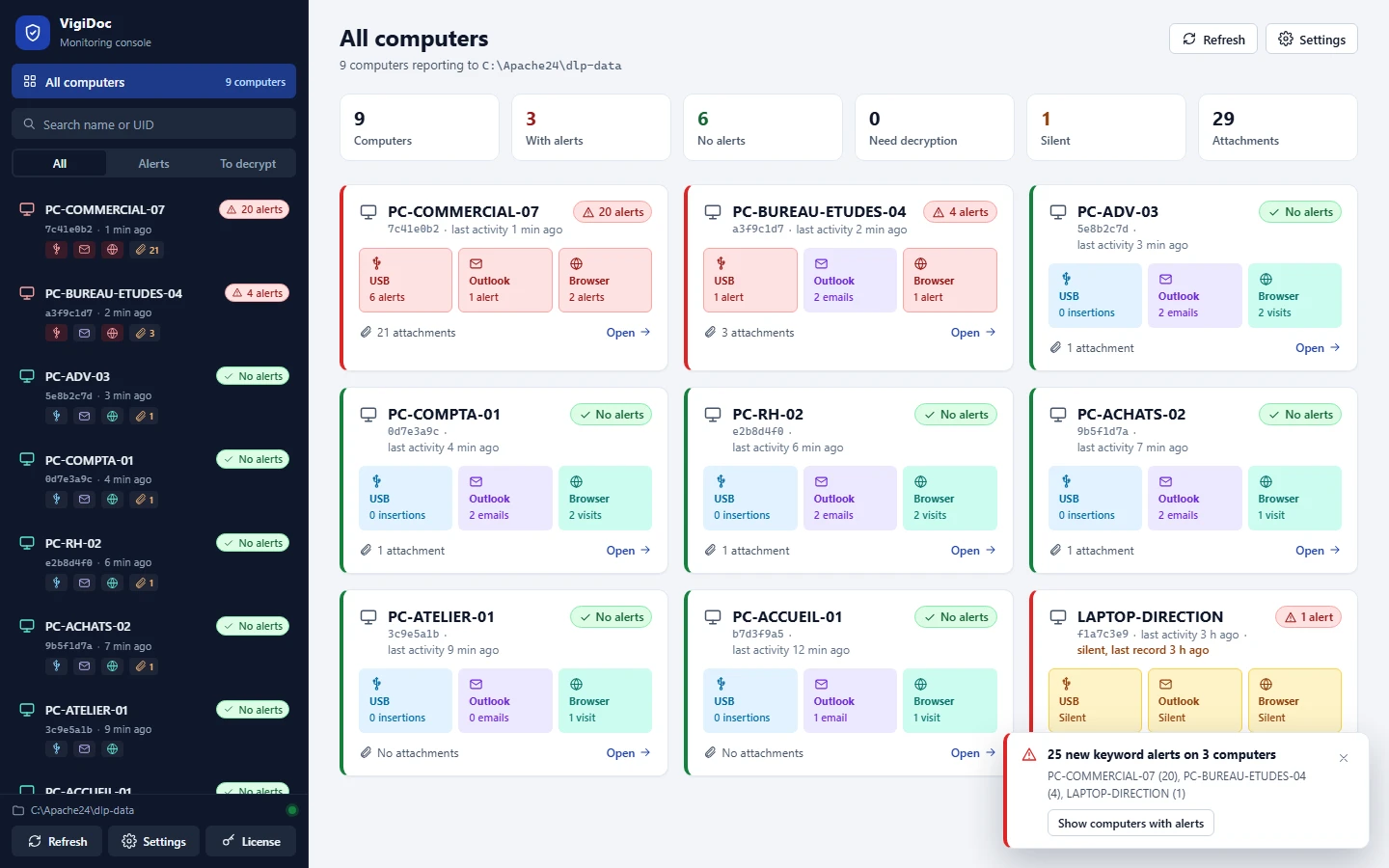
French data leak detection software for Windows endpoints, published by SSHack in Paris. Four agents monitor four channels: USB drives and disks (every copied file is logged and an encrypted copy is sent to the server), Outlook (sent emails, recipients and attachments), Gmail and Outlook on the web (attachments captured when they are added, with the account, subject and recipients, through a Chrome, Edge and Firefox extension) and the Chrome, Edge and Firefox browsers (address, title and time of each visit). Alerts are triggered by the keywords you define. The server stays on your premises, including on an air-gapped network, with a license activated offline.
Its limits, to read against the tables: VigiDoc never blocks a transfer; it runs only on Windows; among webmail services, it covers only attachments in Gmail and Outlook on the web, without reading the message text; it does not read content sent to other websites; it does not cover printing, cloud sync or phones connected over USB in file transfer mode; its pricing is quote-based.
Which tool for which kind of small business
The table below starts from your situation, not from features. It shows the tools to look at first, including when VigiDoc is not one of them.
| Your situation | Look at first | Why |
|---|---|---|
| You already have Microsoft 365 E5 | Microsoft Purview | The Endpoint DLP license is included: nothing to host, many channels, blocking available. VigiDoc is only worth considering if you want to keep logs and file copies on your own servers. |
| You're on Microsoft 365 Business Premium | Microsoft Purview Suite for Business Premium, or an on-premises tool | Business Premium includes DLP for email, SharePoint and OneDrive, but not for endpoints. The add-on Purview suite costs €8.70 excl. VAT per user per month, and the data stays in the Microsoft cloud. Details: what's included, what you need to add. |
| You need to block, not just see | Endpoint Protector, ManageEngine, Safetica, Acronis DeviceLock; for USB only, Group Policy or Intune | VigiDoc blocks nothing: it is not the right choice if blocking is a requirement. ManageEngine's Device Control Plus has a free edition for up to 25 endpoints. To decide: block or monitor USB drives? |
| Your computers are on an air-gapped network, with no Internet | Safetica On-Prem, VigiDoc | They are the only two tools in this comparison that state they work this way. For the other on-premises tools, ask the vendor how updates, license activation and the console work without Internet access. |
| Your fleet includes Macs or Linux computers | Endpoint Protector (Windows, macOS, Linux); Safetica, Purview, Forcepoint, Trellix (Windows and macOS); Acronis DeviceLock (Windows and macOS 10.15) | VigiDoc covers Windows only. |
| You want to know the price before talking to a salesperson | ManageEngine, Microsoft Purview, Safetica (cloud), Teramind (amounts vary by country) | These are the only public prices we found. VigiDoc is quote-based. |
| Your team works only in French | Safetica | Its console is available in French. VigiDoc's Dashboard is in English, even though SSHack's website and team are French-speaking. |
| You want to cover all data flows (network, cloud, web) with a dedicated security team | Forcepoint, Trellix, Microsoft Purview, Acronis DeviceLock | These offer the broadest channel coverage found in this comparison. |
| You want to monitor user activity beyond data leaks | Teramind | That is its positioning: activity monitoring and insider risk on a single platform. |
| Windows fleet, small team, data to keep in-house, need to know what left (employee departure, investigation) | VigiDoc; Acronis DeviceLock (observation mode with data shadow copies) | VigiDoc keeps an encrypted copy of files copied to USB drives and of Outlook attachments on your server, and raises keyword alerts without interrupting work. |
Whatever the tool, workstation monitoring must remain proportionate to its purpose, and employees must be informed beforehand. In France, this is required by the Labor Code and the recommendations of the CNIL (France's data protection authority); check the rules that apply in your country.
When VigiDoc is not the right choice
- You need to block transfers, not just see them.
- Your computers run macOS or Linux.
- The leaks you're worried about go through webmail other than Gmail and Outlook on the web, a file-sharing site, printing or cloud sync (OneDrive, Dropbox): VigiDoc sees the visit to a web page, not the file sent.
- Your team cannot work with an English-language interface.
- You're already on Microsoft 365 E5 and storing logs in the Microsoft cloud suits you.
- You need a public price before any conversation.
How we compared
- Collection date. October 14, 2026. Offerings change: each cell is valid as of that date, and the update date at the top of the page changes with each revision.
- Sources. Vendor pages only: website, pricing page, technical documentation, knowledge base. No aggregators, review sites or reseller prices. The full list is in the sources.
- Tools selected. The endpoint DLP vendors a French small business comes across when comparing offerings, plus a Switzerland-based vendor that offers on-premises DLP with a French-language page (Acronis). Our searches for "French DLP software", "sovereign DLP" and "on-premises DLP" (« logiciel DLP français », « DLP souverain », « DLP sur site ») turned up no other French endpoint DLP vendor; a German device control vendor was not included, as it does not present its product as DLP.
- What the cells mean. "Not observed": absent from the pages consulted, without concluding that the feature does not exist. "Not published": the vendor directs you to request a quote. "Stated": claimed by the vendor, not tested by us.
- Limits. We did not test the products: the features are those described by the vendors. The amounts in Teramind's price list, displayed in the visitor's local currency, and the price of Microsoft 365 E5 were not recorded.
- Conflict of interest. VigiDoc is our product. It is assessed against the same criteria as the others, and its limits appear in every table.
- Corrections. Spotted an error, or has a vendor changed its offering? Let us know: we will correct it and update the page date.
Compare on your own fleet
A table won't tell you how many alerts you will have to handle each week, or what your computers actually let out. You can test VigiDoc for 30 days on your Windows computers, starting when the server is installed, with no license to request. The server and the data stay on your premises.
After a month, you will know which files were copied to USB drives, which attachments left via Outlook, Gmail or Outlook on the web, and which pages related to your keywords were visited. You can then compare it with the other tools in these tables, with facts in hand.
Frequently asked questions
Which DLP software should a small business choose?
There is no best tool in absolute terms. A small business first needs to decide where its logs and file copies must be stored, whether it needs to block or only detect, and which channels to monitor. Price, the tool's language and a trial on its own computers then make the difference.
Is there a French DLP software vendor?
Yes: VigiDoc is published by SSHack, in Paris. In our research on October 14, 2026, we found no other French vendor of endpoint DLP. Among vendors with a presence in Europe, Safetica has offices in Prague and Brno, and Acronis presents itself as a company based in Switzerland.
Can DLP software be installed on-premises, without the cloud?
Yes. In this comparison, every tool except Microsoft Purview can be installed on your servers or on a virtual machine. However, only Safetica On-Prem and VigiDoc state that they work on an air-gapped network, without Internet access.
How much does DLP software cost for a small business?
Few vendors publish their prices. As of October 14, 2026, ManageEngine lists $795 per 100 endpoints per year for Endpoint DLP Plus Professional, Safetica from $72 per user per year for its cloud offering, and Microsoft €8.70 excl. VAT per user per month for the Purview suite added to Business Premium; Teramind shows a public price list whose amounts depend on the visitor's country. The others, VigiDoc included, are quote-based.
Is Microsoft 365 enough as DLP software?
Microsoft 365 Business Premium includes DLP for Exchange Online, SharePoint and OneDrive, but not for endpoints (copying to USB drives, printing). Endpoint DLP requires Microsoft 365 E5 or an add-on Microsoft Purview suite. Either way, the console and the logs are in the Microsoft cloud.
Does VigiDoc block file transfers?
No. VigiDoc detects and alerts. It logs copies to USB drives, Outlook emails and their attachments, attachments added in Gmail and Outlook on the web, and web browsing. It keeps an encrypted copy of the files on your server. If you need blocking, choose one of the other tools in this comparison, or use Group Policy or Intune for USB drives.
Sources
Vendor pages, all consulted on October 14, 2026. Where the French version of a page was consulted, the link points to it.
- Microsoft (French pages): Microsoft Purview Data Security (product page and Microsoft Purview Suite pricing); Microsoft Purview Suite for Business Premium; Learn about Endpoint data loss prevention, Microsoft Learn, updated September 24, 2026; Microsoft Purview service description, Microsoft Learn, updated October 13, 2026.
- Safetica: pricing page; Safetica On-Prem; System requirements and compatibility overview, article of October 1, 2026; console and notification languages, article of December 8, 2025; contact.
- Endpoint Protector: DLP product page; purchase page; French-language blog; Netwrix documentation, System Dashboard; Netwrix company page.
- ManageEngine: Endpoint DLP Plus; system requirements; Device Control Plus; French-language page.
- Forcepoint: Forcepoint DLP (French page and English version); F1E v26 release notes, compatibility.
- Trellix: documentation, Key features; documentation index (ePolicy Orchestrator on-premises and SaaS).
- Teramind: DLP solution; pricing page; supported platforms and deployments, article of August 21, 2026; on-premises deployment guide, article of August 17, 2026; licensing model, article of April 13, 2026.
- Acronis (French pages): Acronis DeviceLock DLP; features; system requirements; company page.
- VigiDoc: software overview (how it works, data sovereignty, license and trial).